After focusing on the Application Lifecycle and View Lifecycle in iOS, our next topic will be Networking. But before getting into details in networking, we should know one more thing.
And this crucial thing is concurrency. We face handling more than one operation at the same time in today’s world. We want to shorten users’ waiting time even though it’s not necessary. Displaying the loading for a long time or freezing the UI moves the user’s focus away and decreases the app usage from time to time. At the same time, keeping attention on the app became really hard. Therefore, instead of executing operations synchronously, one after another, we have to run them in parallel to have a better user experience.
Why do we need to know Concurrency really well?
These days, almost every app works with online data transfer (network requests and responses). Handling network operations properly is really important. Besides the app functionality, we don’t want to interrupt or block the user while using the app. Interruptions always result in a bad user experience. So, while we’re displaying any kind of UI, we mostly deal with the network requests concurrently. We can send a network request and wait for the response while displaying a loading animation. Concurrency is handled by different APIs in iOS. We’ll focus on basic Grand Central Dispatch (GCD) to understand concurrency.
In the programming world, concurrency is a big topic and has a vital place. If you want to learn more about concurrency, this answer on Quora explains well.
Before talking about DispatchQueue, we should understand the queues first. Because DispatchQueue can run operations on different queues.
What exactly do we need to know about Queues?
There are two types of queues in iOS, the main queue and the others. We have only one main queue, but we can have more than one background queues that can run different operations on it. Background queues run on the thread pool according to their priorities. But the main queue runs on the main thread. All UI (user interface) updates have to run on the main thread. Therefore, we use the main queue for the UI.
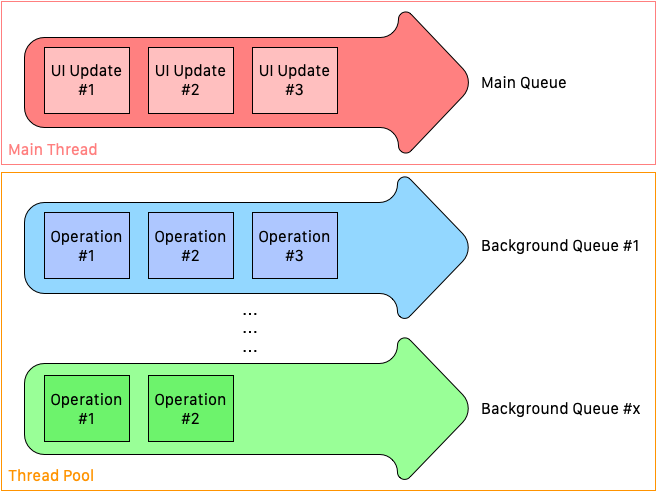
The most important thing here is having only one main queue. The main queue should be used wisely. Since every UI update has to be done in the main queue, if we use the main queue for every other operation, we can freeze the UI operations. For example, if we send a network request on the main queue and update the UI according to the response, we will see the UI is not responsive until we get back the data. The hint is that we should use background queues as much as we can and try to leave the main queue empty for non-UI operations.
How do we use queues with a simple network request and GCD
Sending a network request is pretty straightforward. URLSession is the most common way for a simple network request. We can send a request via dataTask and get the response data with an error (if any) in a closure.
let url = URL(string: "https://candost.blog/")if let url = url { showLoadingIndicator() // UI Operation; has to run on the main queue let task = URLSession.shared.dataTask(with: url) { (data, response, error) in if error != nil { showErrorAlert(error) // UI operation; has to run on the main queue!! } else { if let data = data { debugPrint(usableData) //JSONSerialization } } debugPrint("Completed")}task.resume()Again, one of the most important things here is that thread handling. We talked about this one under the queues. In this example, we want to display an alert when we get an error from the server. But how can we solve the queue problem here? The lightweight and easiest way to run the UI operation method on the main queue is using Grand Central Dispatch (GCD).
DispatchQueue.main.sync { showErrorAlert(error)}So, while running this code, if an error happens, the app will switch to the main queue and execute the showErrorAlert(error) line. In parallel, the code will continue on the background queue and print Completed to the debug console.
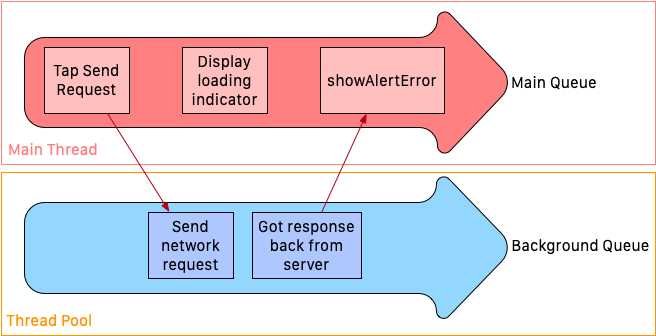
Finally, we can see our example code with better user experience handling. The code below starts on the background queue, and when it needs to show a loading indicator on the screen, we switch to the main queue. The execution continues and starts the task. When we got the response, we were still in the background queue. If there is an error, we now switch to the main queue and display the alert.
DispatchQueue.global().async { let url = URL(string: "https://candost.blog/") if let url = url { DispatchQueue.main.sync { showLoadingIndicator() // UI Operation; has to run on the main queue } let task = URLSession.shared.dataTask(with: url) { (data, response, error) in if error != nil { DispatchQueue.main.sync { showErrorAlert(error) // UI operation; has to run on the main queue!! } } else { if let data = data { debugPrint(usableData) //JSONSerialization }6 collapsed lines
} debugPrint("Completed") } task.resume() }}It’s possible to be confused by the main thread vs the main queue and why they are not the same. There are one main thread and one main queue. If you’re curious about more details, you can read this post.
What if we have a bit more complicated problem
We have talked about a simple network request and GCD. Whilst it’s important for many apps to handle more complicated tasks concurrently, GCD provides only an easy and pretty straightforward solution. We may need to cancel a concurrent operation or follow its state. GCD doesn’t provide a solution to these problems. That’s why we will get help from Operation and OperationQueue. Operations are chained by OperationQueue and they can also be dependent on each other. For example, if we want to download food images after fetching the restaurant food inventory, we should add the fetch operation as a dependency to the download operation and put them in the same OperationQueue. So, the download operation will wait for the fetch operation to finish.
Let’s have a look at the basic Operation example:
class FetchRestaurantInventoryOperation: Operation { var restaurantData: RestaurantData var networkProvider: NetworkProvider
// 1 private var _executing = false { willSet { willChangeValue(forKey: "isExecuting") } didSet { didChangeValue(forKey: "isExecuting") } }
// 161 collapsed lines
private var _finished = false { willSet { willChangeValue(forKey: "isFinished") }
didSet { didChangeValue(forKey: "isFinished") } }
init(restaurantData: RestaurantData, networkProvider: NetworkProvider) { self.restaurantData = restaurantData self.networkProvider = networkProvider }
// 2 override func main() { if isCancelled { self.finish(true) return }
self.executing(true) self.networkProvider.fetchInventory() { jsonData in if let json = jsonData, !json.isEmpty { guard let serializedDictionary = try? JSONSerialization.jsonObject(with: json, options: []) as? [String: Any] else { return } self.restaurantData.setInventoryJSON(serializedDictionary) self.restaurantData.state = .downloaded } else { self.restaurantData.state = .failed } self.executing(false) self.finish(true) } }
// 2 override var isExecuting: Bool { return _executing }
// 2 override var isAsynchronous: Bool { return true }
// 2 override var isFinished: Bool { return _finished }
// Helper methods func executing(_ executing: Bool) { _executing = executing }
func finish(_ finished: Bool) { _finished = finished }}Instead of getting into too many details about Operation and OperationQueue, let’s take a look at the important things which we should know:
- An operation object is a single-shot object. It’s not reusable. When we use the operation object, it’s basically done. If we want to repeat the same operation, we need to create another instance from our custom operation class.
Operationis an abstract class that is associated with a single task. So, we cannot create new instances ofOperation. Instead, we can subclass it like in the example or use the system-wide defined ones (e.g.,BlockOperation). If an operation has a dependency, it is not considered ready until all of the dependencies are finished executing. When the last dependency is finished, the operation starts executing.Operationis KVC and KVO compliant (we will talk about this later). So, we can watch the changes in operations by attaching observers. But we shouldn’t bind the operation to the UI elements. Because UI elements must execute on the main thread.- While it’s safe to call the methods in
Operationfrom multiple threads, we should take care of the thread safety in overridden methods and custom implementation. - If we are creating a non-concurrent operation, only overriding the
main()method is enough. But for concurrent operation, we need to overridestart(),isAsynchronous,isExecuting,isFinishedat minimum. In the example, we have a concurrent operation. That’s why we have all the overridden methods and properties commented with the number2. But we didn’t overridestart()method. The reason isstart()method automatically calls themain()method when invoked. While overriding theisExecutingandisFinishedmethods, we have to generate KVO notifications when the operation is finished or canceled. In the example, we can see these parts with the comment with the number1. - In case we override
start()method, we should never callsuperin the custom implementation.
Last words
If we want to keep our apps responsive and run multiple processes in parallel easily, we have to understand concurrency and use our tools according to our needs. GCD gives us simplicity. But when we want to have advanced and custom operations like canceling the execution or reusing some parts of the code for concurrent operations, it is simply not enough. Using Operations and OperationQueues would be less painful in these cases. GCD and Operation are not the same things. Convenient use of both is key to creating robust and user-friendly iOS apps.
Further Reading: